



Agent Mode in Excel for Windows and Mac
Short VersionAgent Mode is coming to Microsoft 365 Copilot for Excel. Due mid-January to early March 2026.
DetailsAgent Mode in Microsoft 365 Copilot for Excel (Excel for Windows and Excel for Mac)...

OpenAI’s GPT-Image-1.5 model available in Microsoft 365 Copilot
Short VersionM365 Copilot, Copilot Chat and Create will now use GPT‑Image‑1.5 for images. Due mid-December 2025 to late January 2026.
DetailsMicrosoft is updating M365 Copilot image generation by introducing GPT‑Image‑1.5 (OpenAI’s latest image generation...

Manage your meeting RSVPs in Copilot chat
Short VersionMicrosoft is adding a Copilot chat feature that will let you send quick meeting RSVPs directly in chat. Now due mid-January to late April 2026.
DetailsMicrosoft will introduce a new capability...

Review PDFs in OneDrive using the new Copilot context menu
Short VersionThis feature uses M365 Copilot to explain selected text from a PDF and allows you to customise prompts for tailored results. Due early to late January 2026.
DetailsIn OneDrive for the web,...

Calendar results in M365 Copilot search
Short VersionCalendar Search in Microsoft 365 Copilot makes it easy to find any meeting using natural language – if you can remember anything about the meeting, you should be able to find it....

Data source-specific filters are coming to M365 Copilot search
Short VersionThe new dynamic filtering experience in Copilot search displays a set of source-specific filters. Due early December 2025 to early January 2026.
DetailsMicrosoft is introducing a dynamic filtering experience in Microsoft 365 Copilot search. When you...

ICYMI: Auto, Instant, and Thinking mode selector in Copilot chat
DetailsMicrosoft has added a mode selector to Copilot chat, allowing you to choose how much reasoning to apply to your prompt.
Choose from:
Auto (default): Copilot decides how long to think
Quick response (chat):...

Create and schedule meetings directly in Copilot Chat
Short VersionMicrosoft 365 Copilot will soon let you schedule meetings directly within Copilot chat. Due late November 2025 to late January 2026.
DetailsMicrosoft is introducing the ability to schedule meetings within Microsoft...

Say “Hey Copilot” to start voice in Copilot on Windows devices
Short VersionYou can now say “Hey Copilot” to start voice in Copilot on Windows devices. Now due late February to mid-April 2026.
DetailsYou can start a voice chat with Copilot by saying...

Copilot chats will appear in search results
Short VersionMicrosoft search will soon include results from previous Copilot chats. Now due mid to late December 2025.
DetailsMicrosoft is integrating historical Copilot conversations into Microsoft Search (1). This update allows you...

AI-powered image editing is coming to PowerPoint
Short VersionDesigner editor integration in PowerPoint brings a new image-editing experience. Now due mid-December 2025 to early March 2026.
DetailsThe new Designer editor integration in PowerPoint offers a modern, AI-powered image editing experience directly within your...

Navigation refresh in the M365 Copilot app
Short VersionMicrosoft is updating the Microsoft 365 Copilot app. They claim it has a “simplified, flattened navigation menu with logically grouped features”. Now due December 2025 to late April 2026.
DetailsHere is Microsoft's explanation...

New features coming to (free) Copilot Chat for Outlook, Word, Excel, and PowerPoint
Updated 20th January, 2026: Microsoft: "The change to Copilot Chat in Outlook to expand reasoning to include a user's entire inbox, calendar, meetings, and other enterprise data is starting to roll...

You can now choose PowerPoint deck length, tone and image style when creating with...
Short VersionYou will soon be able to steer presentation length, tone, and AI image style when creating with Copilot in PowerPoint. Due early to mid-December 2025.
DetailsYou can adjust the length, tone,...

Available now: Agents in OneDrive
Short VersionCreate a Copilot agent from your OneDrive, grounded in your OneDrive. Available now.
DetailsThe + Create or upload button in OneDrive now has the option to create an Agent:
Select Agent to...

OneNote for Windows is getting an improved Copilot experience
Short VersionMicrosoft OneNote for Windows desktop is getting an improved experience for on-canvas Copilot features. Due from 12th December 2025.
DetailsCopilot in Microsoft OneNote for Windows desktop will soon see the following...
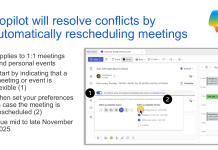
Copilot to automatically resolve and reschedule meeting conflicts
Short VersionCopilot will resolve conflicts by automatically rescheduling 1:1 meetings you have marked as flexible. Now due mid-February 2026 to May 2026 in targeted release.
DetailsCopilot will help you manage scheduling conflicts...

The Teams Channel Agent updates include support for file-based grounding
Short VersionThe Teams Channel Agent updates include support for file-based grounding. Due mid-November 2025 (targeted release).
DetailsThe Channel Agent is a Copilot-powered assistant for Microsoft Teams channels (read more here: Microsoft Teams...

The new Explore Pane will provide M365 Copilot guidance
Short VersionMicrosoft is introducing an M365 Copilot Explore Pane, a new side panel offering guided, contextual help to support your Copilot use. Targeted release now due early to late December 2025.
DetailsMicrosoft...

Real-time voice interactions are coming to Copilot podcasts
Short VersionThe Microsoft 365 Copilot podcast feature is gaining real-time voice interactions. Now due early April to late May 2026.
DetailsCopilot audio summaries are a great way to absorb document content, but...

What’s new in Microsoft 365 and Copilot? July 2026
*Members only early access* Welcome to our seventh roundup of 2026. We review what was announced, released, and delayed across Microsoft 365 and Copilot...


