



PowerPoint Live: Present to Teams from PowerPoint Web App
Short version:While in a Teams meeting, you will be able to present your slide presentations with one click of the Present in Teams button in PowerPoint for the web to the remote audience...

PowerPoint Copilot ‘Create presentation from file’ is gaining support for protected and encrypted Word...
TL;DRMicrosoft PowerPoint Copilot ‘Create presentation from file’ will soon support protected or encrypted Word documents. Due early to late June 2024.
DetailsPreviously, users who wanted to make a new presentation from an...

Copilot Agent mode in PowerPoint gets updated capabilities
Short VersionAgent mode in PowerPoint gets updated, rewrite, translate, and speaker notes features. Due mid-March to late April 2026.
DetailsMicrosoft is updating Agent mode in PowerPoint, building on the changes announced in...
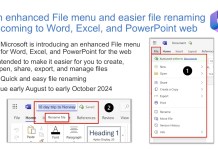
Word, Excel, and PowerPoint web are getting an enhanced File menu
TL;DRMicrosoft is introducing an enhanced File menu for Word, Excel, and PowerPoint for the web. This update is intended to make it easier for you to create, open, share, export, and...

Cancelled: Turn Teams Meetings into PowerPoint Slides
Update 23rd January 2026: "We are no longer moving forward with this feature. We apologize for any inconvenience".
Short VersionCopilot in PowerPoint will soon allow you to reference a Teams meeting to...

Microsoft Teams meeting presenters will be able to view chat while screen-sharing
DetailsA new Chat icon on the Teams meeting presenter toolbar will soon allow presenters to view the meeting chats while sharing their screen:
The compact view of the meeting chat will be...

Quick access to Teams and SharePoint document libraries from desktop Office apps
Some people head to a file location in Teams or SharePoint, find a file and click it to open it. Other people, like me, like to open an app such as...

Easily stay on-brand with images when creating PowerPoint presentations with Copilot
TL;DRYou will soon be able to create presentations with M365 Copilot in PowerPoint using your organisation's brand images. Now due early June to early July 2025.
DetailsYour organisation has three options with...

Recommended Files in Office: Excel, Word & PowerPoint for Microsoft 365
Short version:Coming to Office on Windows: Recommended for you allows you to keep track of work around you and choose files with activity that matters most to you. On the home...

Copilot’s ‘Visualise this slide’ skill is coming to PowerPoint
4th June update. Microsoft: “This skill now supports both Anthropic model and GPT5.5 model.”
Short VersionCopilot's ‘Visualise this slide’ skill is coming to PowerPoint. Due mid-May 2026.
Details
Microsoft has introduced the ‘Visualise this slide’...

Agent Mode in Copilot is coming to PowerPoint for the web
Short VersionAgent Mode in Copilot for PowerPoint web lets you create and refine presentations using natural conversation, whilst preserving formatting and branding. Now due mid-February to late April 2026.
DetailsAgent Mode in PowerPoint...

Copilot Chat is coming to M365 apps for users without a Copilot licence
Short VersionCopilot Chat will soon be available as a side-by-side experience in Word, Excel, PowerPoint, Outlook, and OneNote for users without a Copilot licence. Due late June to September.
DetailsMicrosoft is adding...

On hold: OneDrive will soon get a new ‘Export as PDF’ feature
Update 24th July from Microsoft: "After further review, we are not able to roll this out at this time. We apologize for any inconvenience".
Short VersionOneDrive will soon get a new Export...

New features coming to (free) Copilot Chat for Outlook, Word, Excel, and PowerPoint
Updated 20th January, 2026: Microsoft: "The change to Copilot Chat in Outlook to expand reasoning to include a user's entire inbox, calendar, meetings, and other enterprise data is starting to roll...

Personal custom skills for Copilot in PowerPoint
Short VersionCopilot in PowerPoint will soon support personal custom skills. Upload a skill folder containing a SKILL.md file to a designated location in OneDrive, and it will automatically appear in the...

The Flux.2 Flex image generation model comes to PowerPoint Copilot for better visuals
Short VersionBlack Forest Labs' Flux.2 Flex image generation model is now available in PowerPoint with Microsoft 365 Copilot. It's optimised for high-quality visuals with improved text and layout rendering, and appears...

M365 Copilot can convert paragraphs to lists in PowerPoint
Short VersionIn PowerPoint, use Copilot to convert your paragraphs of text to bullet points or numbered lists…no Copilot licence required! Due late March to mid-May 2025.
DetailsYou will soon be able to...

Cameo in PowerPoint Live
TL;DR:With Cameo in PowerPoint Live, you will be able to integrate Teams camera feed into PowerPoint presentation and customise how and where you want to appear on slides. Due September 2022.
Details:Cameo...

Copilot’s ‘Prepare for Questions’ skill in PowerPoint
Short VersionCopilot's new 'Prepare for Questions' skill in PowerPoint helps you become a more confident presenter by analysing your presentation, spotting potential weak points and anticipating the questions your audience might...

Copilot’s ‘Review this presentation’ skill in PowerPoint
4th June update. Microsoft: "This skill now supports both Anthropic model and GPT5.5 model."
Short VersionCopilot's 'Review this presentation' skill is now available in PowerPoint. It reviews your existing slides and gives...

What’s new in Microsoft 365 and Copilot? July 2026
*Members only early access* Welcome to our seventh roundup of 2026. We review what was announced, released, and delayed across Microsoft 365 and Copilot...


